Effects
Drawing zone chases
Draw your own Zone Chase maps with coloured lines and boxes, and preview them without lasers.
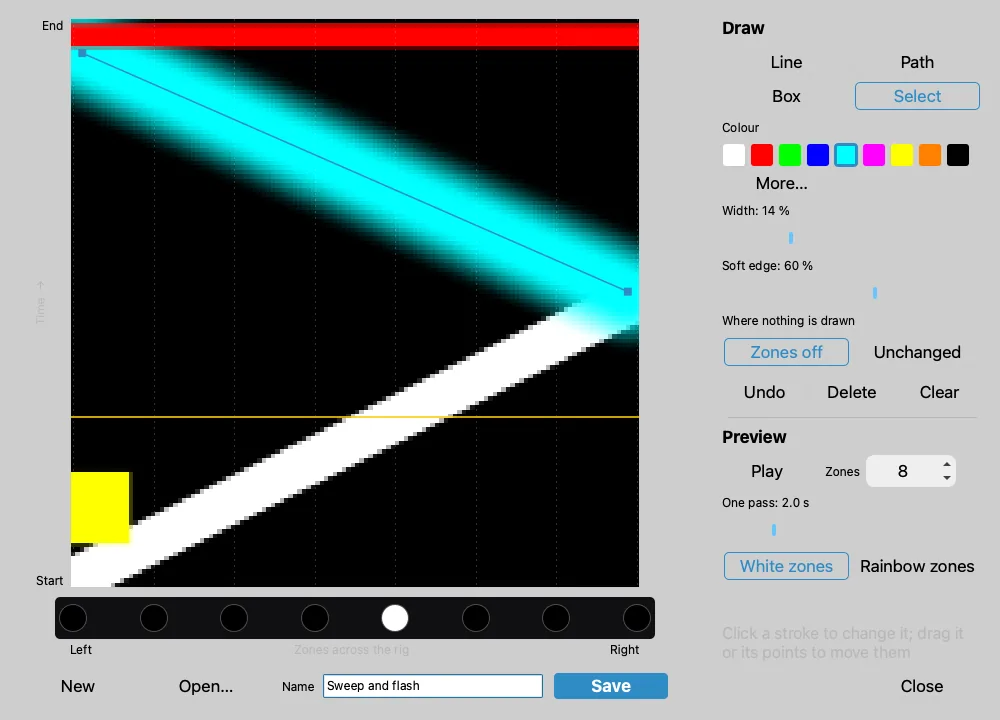
The Zone Chase Editor draws a chase map for Zone Chase with coloured lines, so you don't need an image editor.
Open the editor
- Settings → Master FX → Zone Chase: the pencil button beside Available draws a new chase; the edit button opens the selected one.
- A Zone Chase cue effect: the pencil button beside its map list.
- A timeline Zone Chase clip: Draw a new zone chase… at the end of its Pattern choices (Add Keyframe Here… or Set Choice…).
Draw a chase
Across the map is the rig, from the left zone to the right one. Up the map is time, from the start of a pass to its end.
- Pick a tool: Line, Path, Box or Select.
- Pick a colour, a Width and a Soft edge.
- Draw on the map. The zones below play the chase in a loop.
- Type a Name and click Save.
| Shape | What the zones do |
|---|---|
| Diagonal line | A sweep across the rig |
| Horizontal line | Every zone flashes at once |
| Vertical line | One zone holds the colour |
| Box | A group of zones holds the colour for a while |
- Where nothing is drawn: Zones off blacks out the zones between strokes; Unchanged leaves them their own colours.
- Off (black) is a colour too: draw it to blank zones.
- Hold
Shiftwhile drawing a line to keep it straight across, straight up or at 45°. - Path: click each point; double-click,
Enteror right-click finishes. - Select: click a stroke to change its colour, width or soft edge; drag it or its points.
Deleteremoves the selected stroke;⌘Z(macOS) /Ctrl+Z(Windows) undoes.
Use the chase
Once saved, the chase is in the Zone Chase Available list, in the cue effect's map list and in the timeline's Pattern choices. Saving again under the same name updates it everywhere.