
Lasers that
Loop Alchemy speaks CLX, the open protocol behind Clockworks, natively. The DJ’s BPM drives the show tempo. Every deck plays its own timeline in time with its track, and the mixer blends them. No middleware, no plugins.
What comes down the wire
Clockworks reads your DJ software and hardware and publishes the whole show state as CLX. Loop Alchemy consumes it directly.
Playhead position
Per-deck position in seconds, beatgrid position, and a normalised 0–1 position, at up to 60 fps.
Tempo and beat
Live BPM, current beat within the bar, and pitch — feed them straight into the TempoMaster.
Track metadata
Title, artist, album, and file path, delivered the moment a track loads on a deck.
Mixer state
Fader and EQ state (low, mid, high) per deck, so your visuals can react to the mix, not just the beat.
Track length
Full duration per deck, so you always know how far through a track you are.
Application state
Join and resync broadcasts keep Loop Alchemy locked to the session as decks come and go.
Decks, wired to
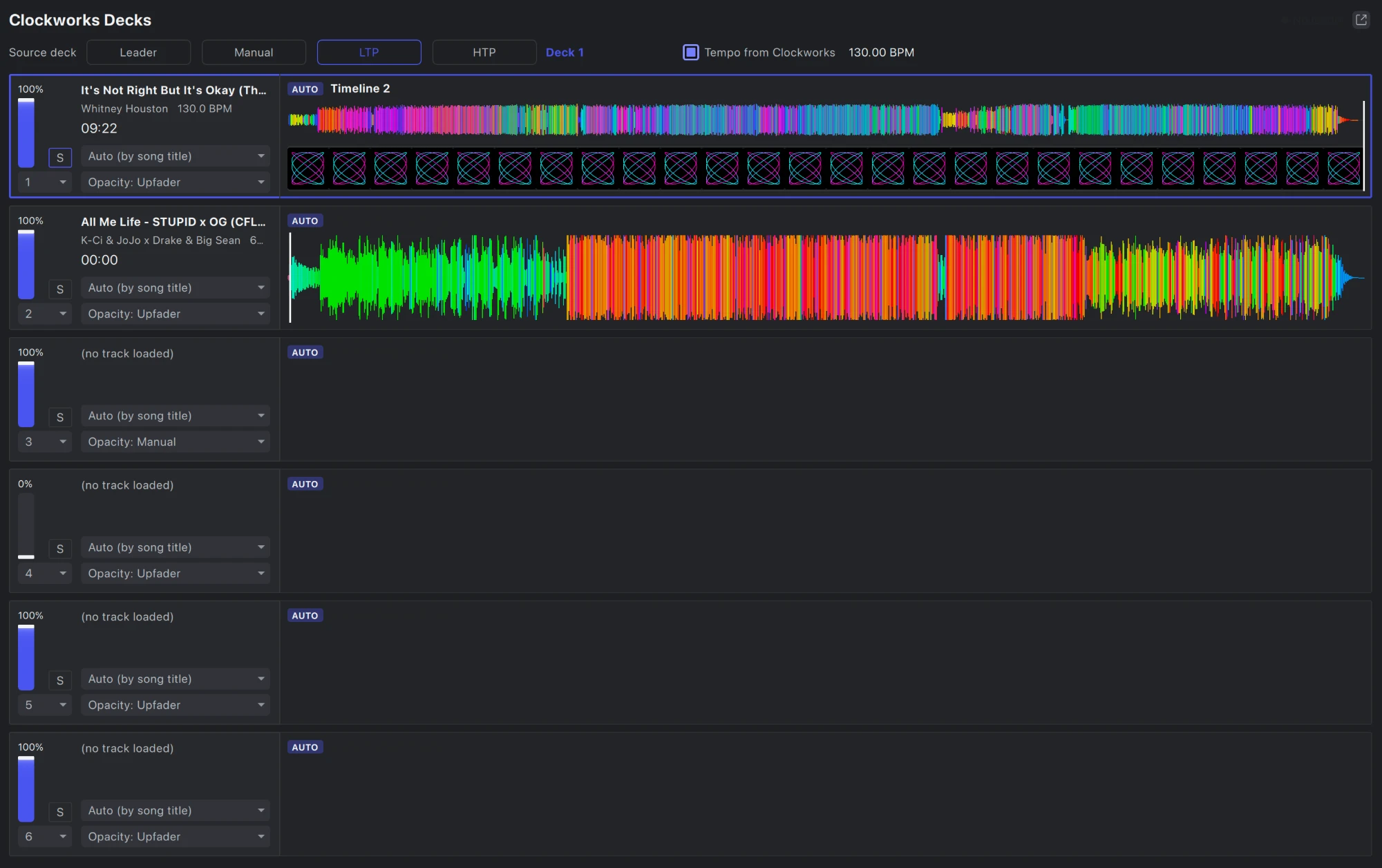
Up to six decks, each with its own waveform, its own timeline and its own blend rule.
Tempo from Clockworks
Tick one box and the show tempo follows the DJ: BPM and bar phase come from the source deck, so every cue and effect lands on the beat.
Time sync
Each deck plays its own timeline at the deck’s exact playhead position. Scrub, loop or jump on the decks and the lasers follow.
Blend timelines
Each deck’s timeline fades with its upfader, the upfader and crossfader together, or a level you set, so the lasers mix with the music.
Choose the source deck
Follow Clockworks’ leader deck, pick one with the S button, or let the faders decide: latest move (LTP) or highest level (HTP).
Auto-load by song title
Give a timeline its song’s title and it loads on whichever deck plays that track. Override any deck by hand.
Waveforms and beatgrids
Each of six decks shows the track’s colour waveform. Import the waveform and beatgrid onto a timeline in one click.
Set up in
CLX runs over UDP on your existing show network. Point Loop Alchemy at the right interface, pick unicast or multicast, and the decks appear.
- 1 Run Clockworks on the machine driving your DJ software or hardware.
- 2 Enable CLX input in Loop Alchemy and choose the network interface to bind to.
- 3 Set the port and pick unicast or multicast to match your Clockworks output.
- 4 Decks appear with live position, BPM, beat, and metadata, ready to drive cues and timelines.
Works alongside your other clocks
Clockworks is one of Loop Alchemy’s time sources. The same show can chase LTC, MTC or Art-Net timecode, follow Ableton Link or MIDI clock, or take a tapped tempo. When Clockworks tempo is off, Loop Alchemy falls back to your usual tempo source.
The signal chain
DJ software & hardware
Serato, Traktor, VirtualDJ, Pioneer Pro DJ Link, Denon StagelinQ.
Clockworks
Reads the decks, generates frame-accurate timecode, and publishes CLX across the network.
Loop Alchemy
Receives CLX natively and drives cues, effects, and the timeline from the live beat.
CLX is a one-byte packet type followed by a MessagePack map over UDP — an open, documented protocol. Loop Alchemy reads its real-time deck, metadata and mixer packets directly.
One network. One clock. One show.
Clockworks handles the timecode. Loop Alchemy handles the lasers. Nothing in between.